Skip to content
Butterfly

Move off your issue tracker in a controlled way.

Modernize your critical workflows.

If the work management tool you've used for years is also part of your procurement, maintenance and approval processes, a migration has to address process rules and system connections as much as data. TaskFlow helps you move your historical work records and daily working practices, and manage your ERP-connected workflows in Butterfly's process engine.

Sprint board: work cards in status columnsDashboard
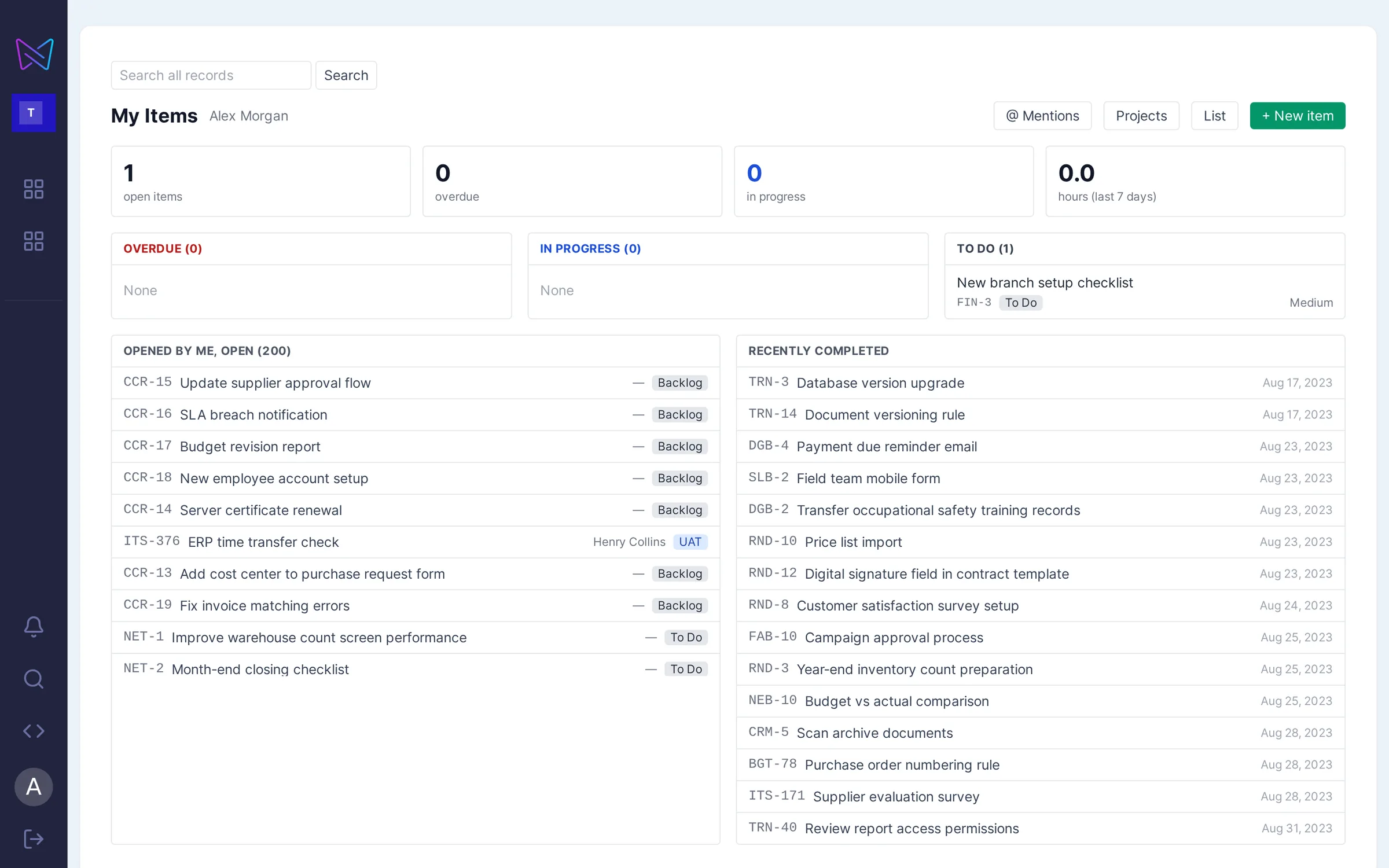
My Work: a person’s open and completed itemsMy Work
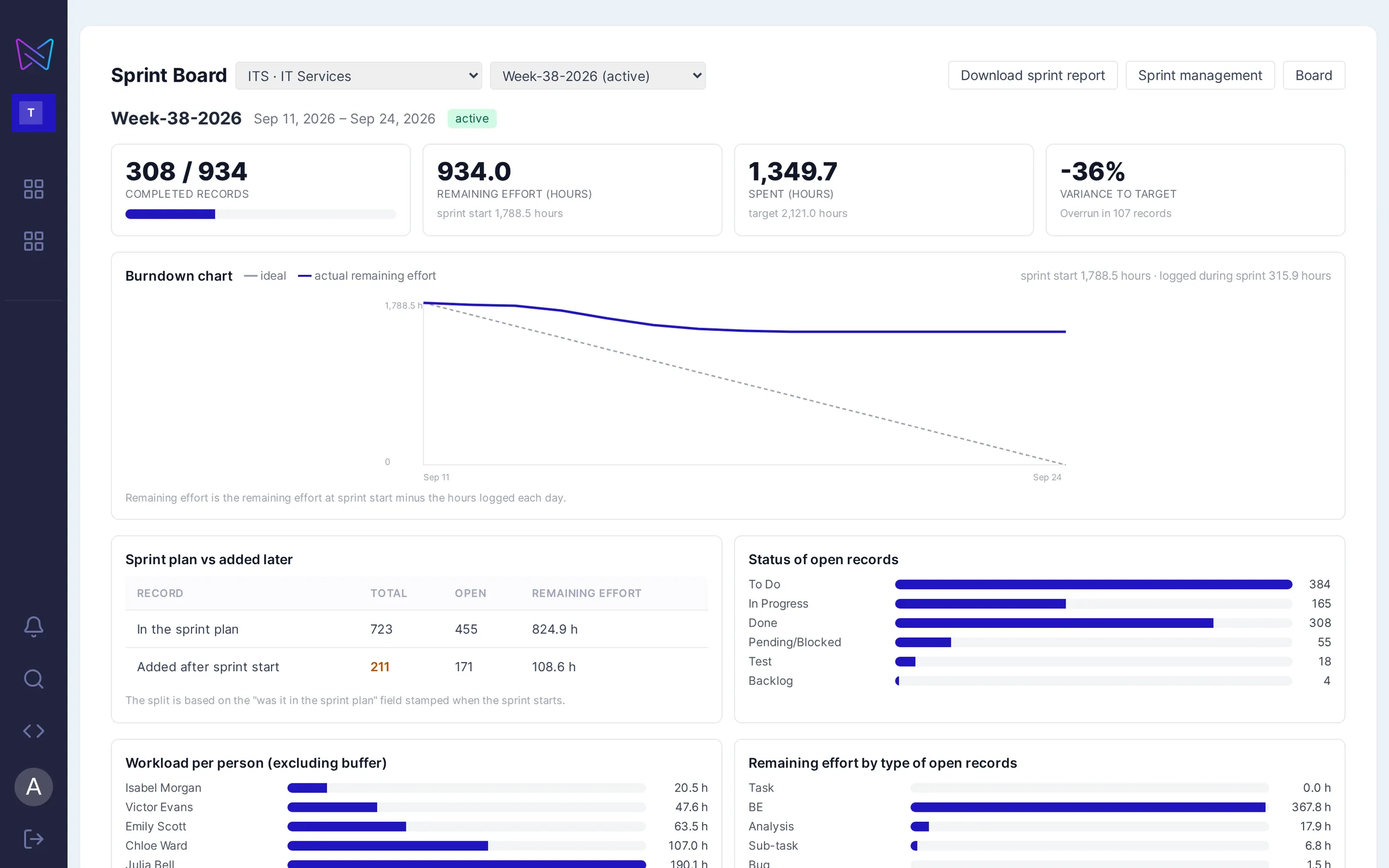
Sprint board: completed items, remaining effort and burndown chartSprint board
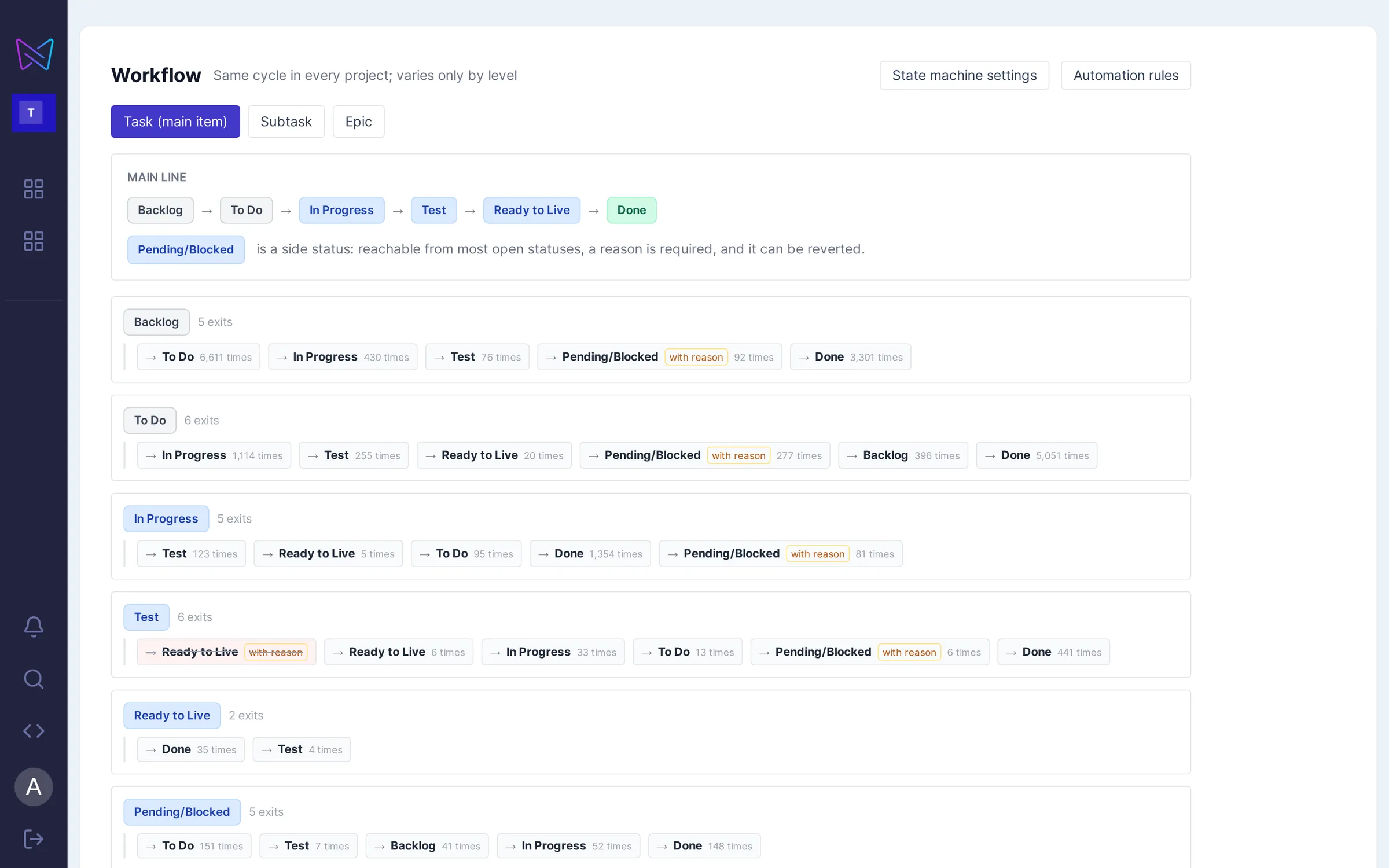
Workflow: statuses and allowed transitionsWorkflow
Dashboard · Sprint board: work cards in status columnsReal TaskFlow screens · names replaced with sample data
89projects
32,130tasks
34,112time log entries
Same daymigration

The Butterfly team's (RG Labs) own work management system moved to TaskFlow in a single day; 27 people have worked in TaskFlow every day since.

Problem

When a purchase request is opened, what runs behind it?

  1. Request openedProcurement team
  2. Amount threshold exceededRule: second approval
  3. Manager approvalApproval chain
  4. Order in ERPIntegration
  5. Request updatedTaskFlow record
Today

A team opens a request in the work management tool. When the amount goes up, a second approval is needed. When a purchase order is created in the ERP, the request record is expected to update. Fields, rules and connections have piled up over the years. When the tool changes, "Will the records come over?" is joined by a new question: "How will this work move forward on Monday morning?"

With TaskFlow

In TaskFlow, request tracking, approval steps and the ERP connection can be handled within the same workflow. For example, the approval sequence for a purchase request can be defined by amount in Butterfly's process engine. While the team tracks the request status in TaskFlow, connection and approval rules keep their place in the process or are redesigned as part of the migration.

Intro film

Teams, tasks and automation in the same flow.

  • Tasks move between team members in a single flow.
  • Recurring work is tied to automation rules.
  • The team works on the same platform, with the same data.
Migration method

Before migrating, decide how each part will be handled.

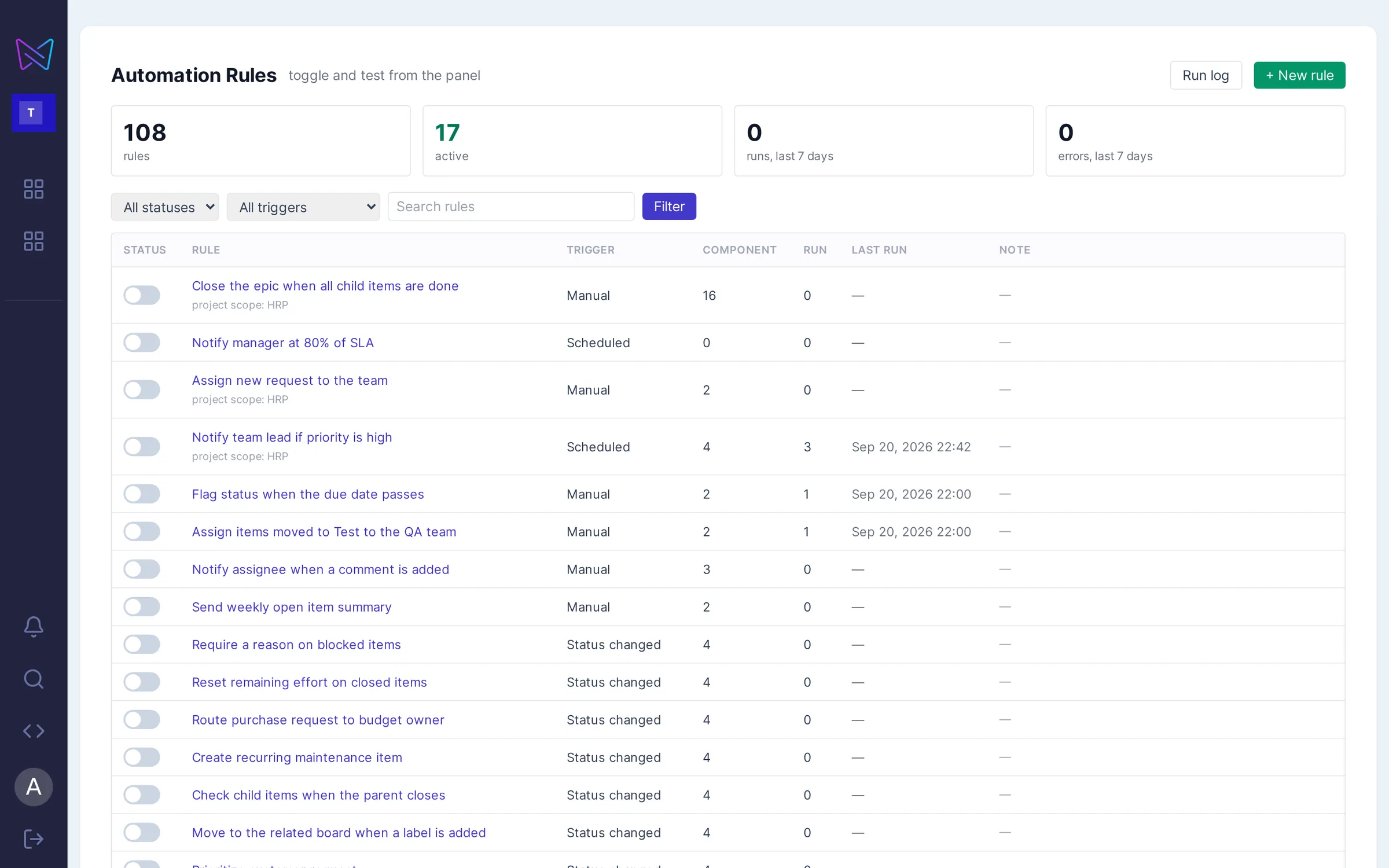
Automation rules: with triggers, components and run logsAutomation inventory
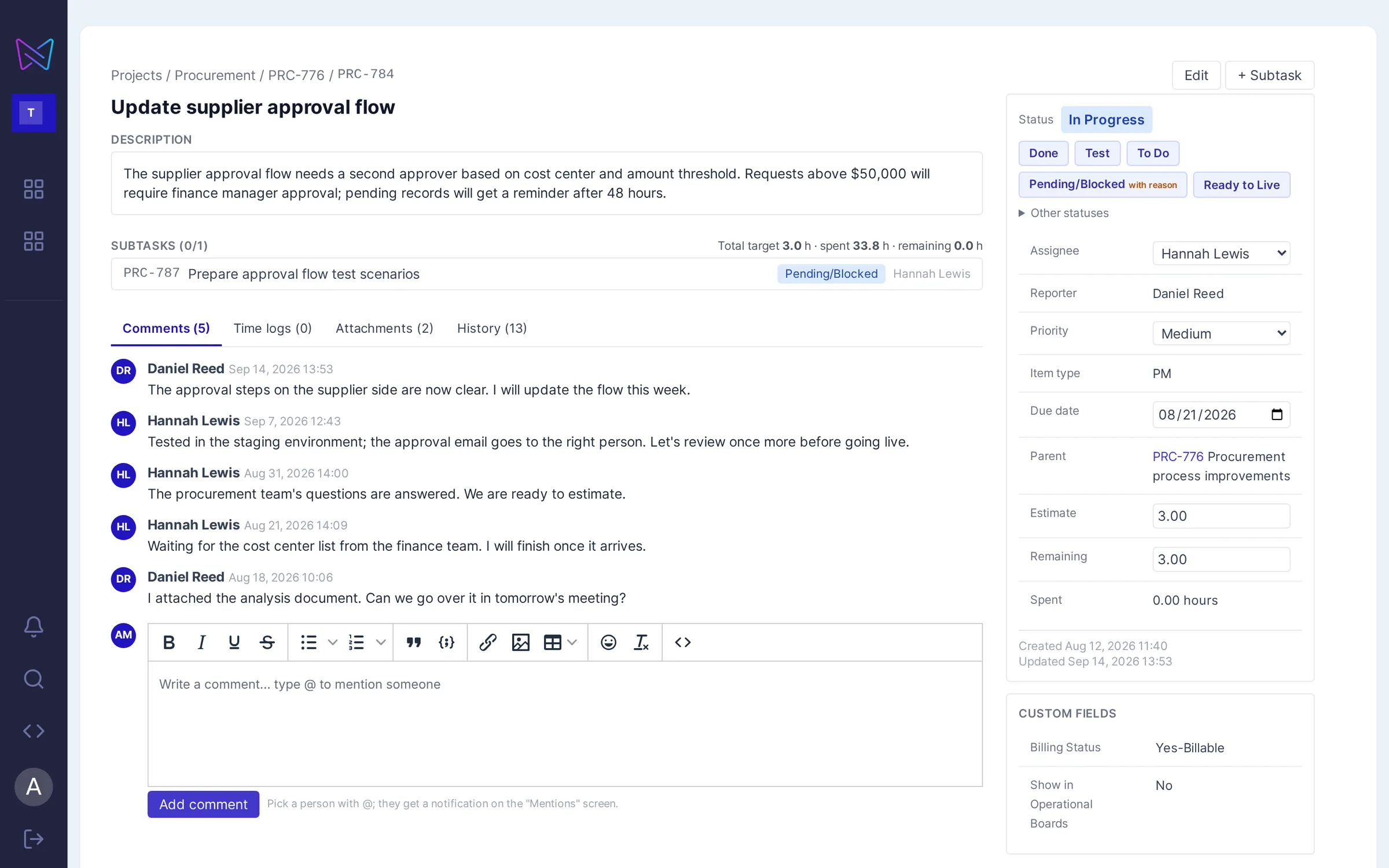
Issue detail: description, subtasks, comments and historyComments and history
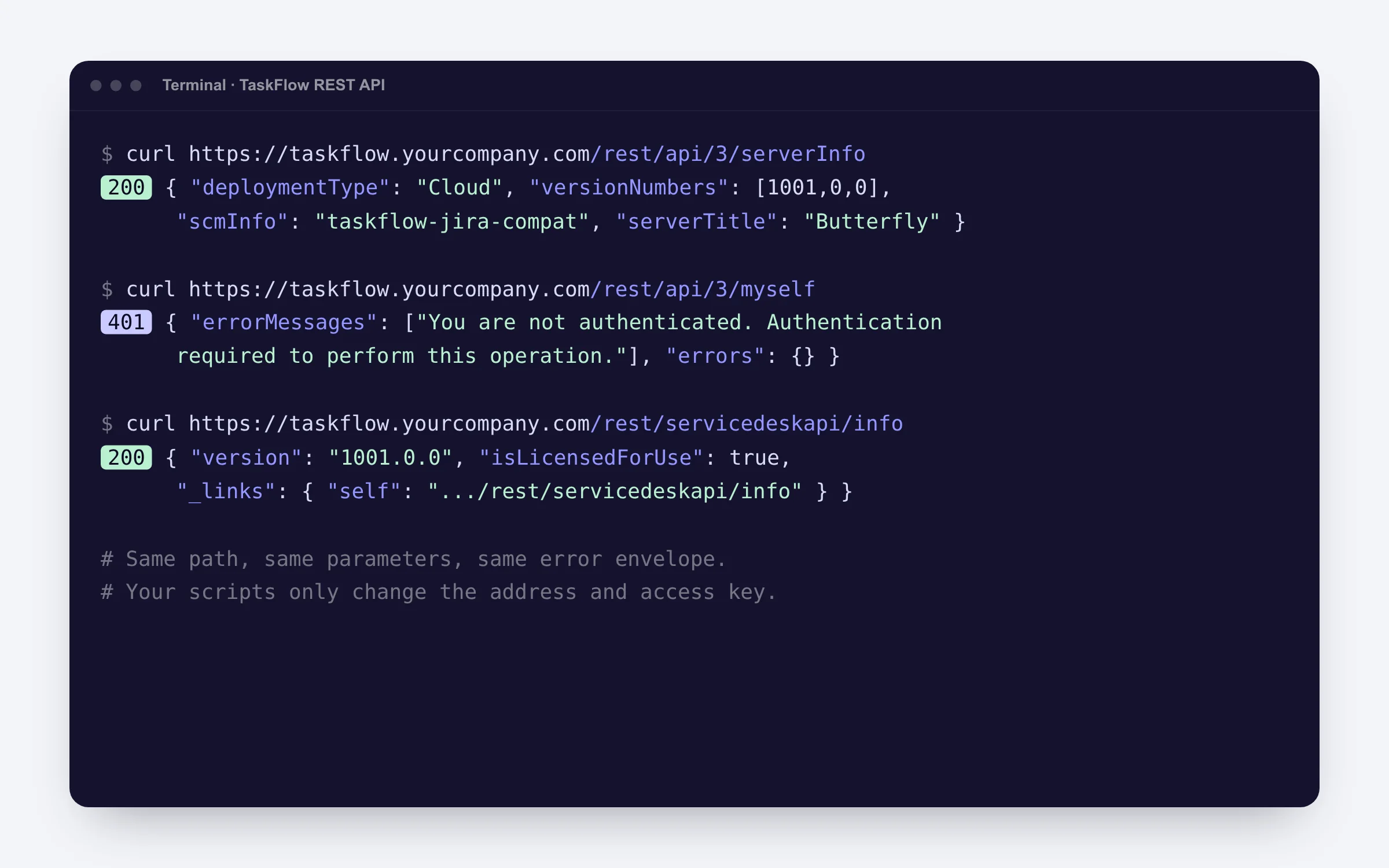
REST API: same endpoint, same response formatSame endpoint, same response
Workflow: statuses and allowed transitionsWorkflow
Automation rules: with triggers, components and run logs

Real TaskFlow screens · project, record and person names replaced with sample data

Daily work

Daily work tracking continues in the same place.

Teams plan their work with boards, sprints, saved filters, capacity planning and roadmaps. When a process owner wants to add a new approval step, they can define the rule in Butterfly's process engine.

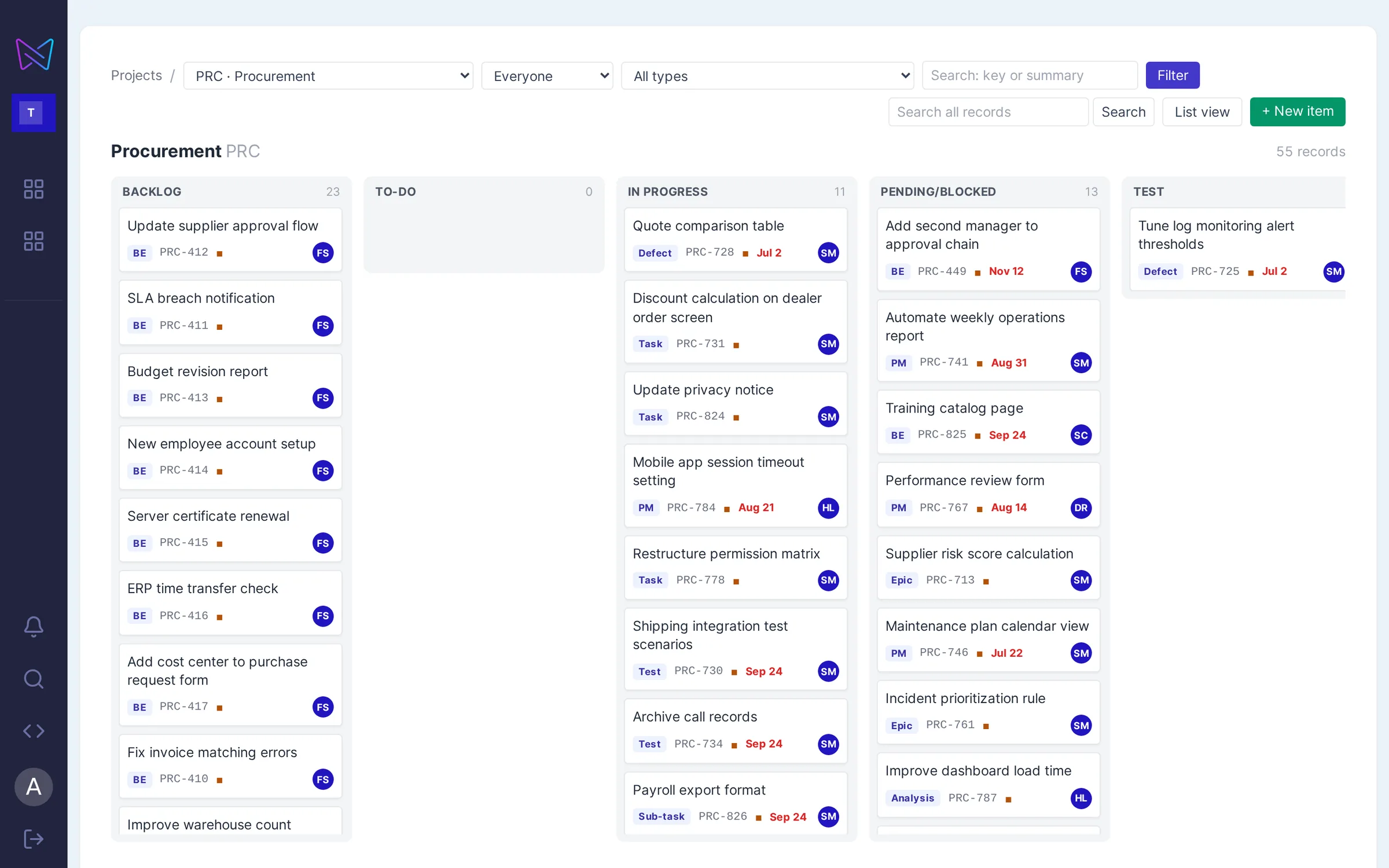
Sprint board: work cards in status columns
Boards and sprints

The team runs work on a board.

Create, start and complete sprints; bulk-add from the backlog; burndown chart and remaining effort per person on the sprint board.

Sprint board: completed items, remaining effort and burndown chart
Sprint board

Sprint status on one screen.

Burndown chart, remaining effort per person and waiting reasons. When the sprint ends, the closing report is prepared automatically.
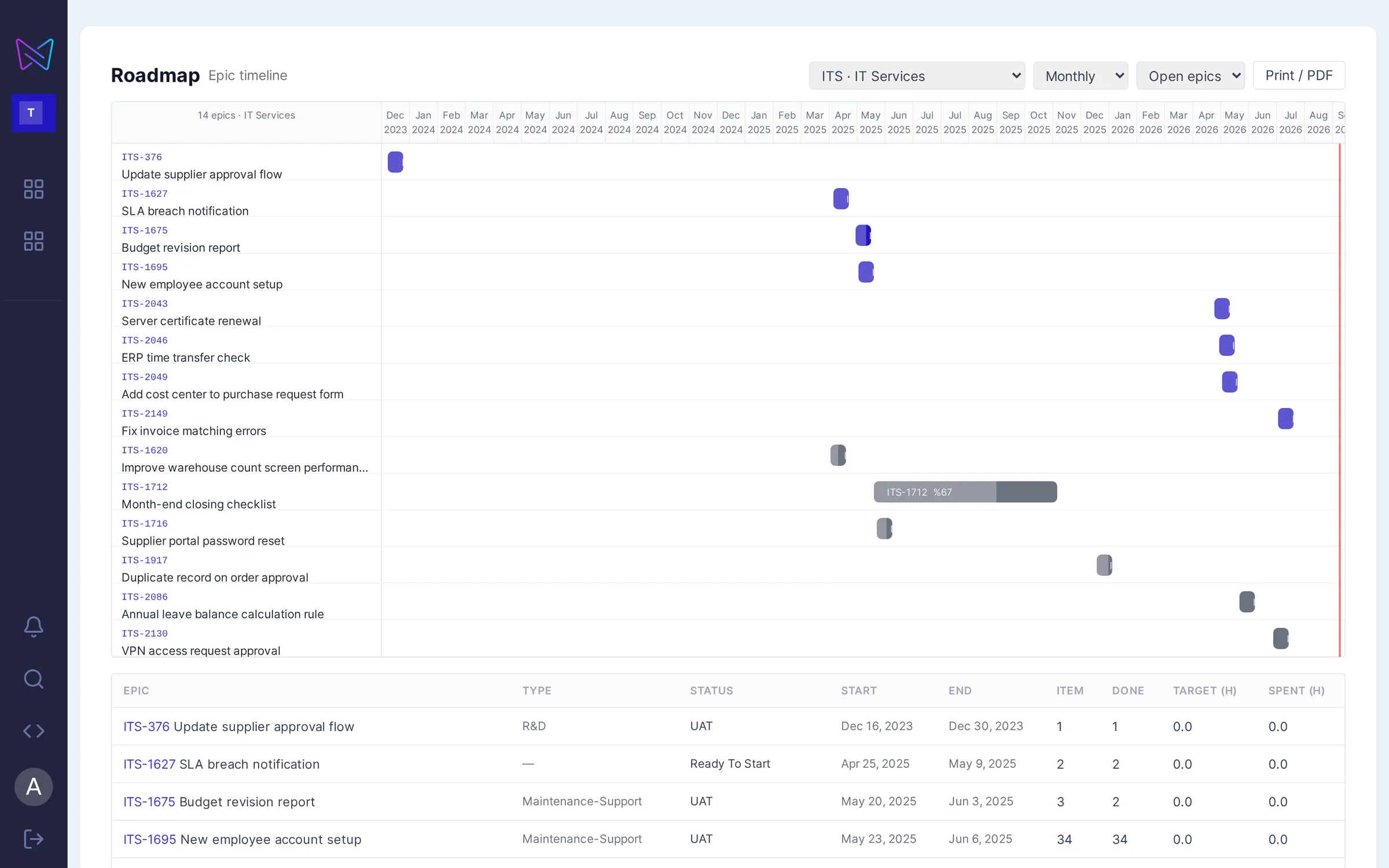
Roadmap: epics on a timeline
Planning and roadmap

Capacity and roadmap in one place.

Person × day planning and capacity view; weekly, monthly and quarterly roadmap by epic.
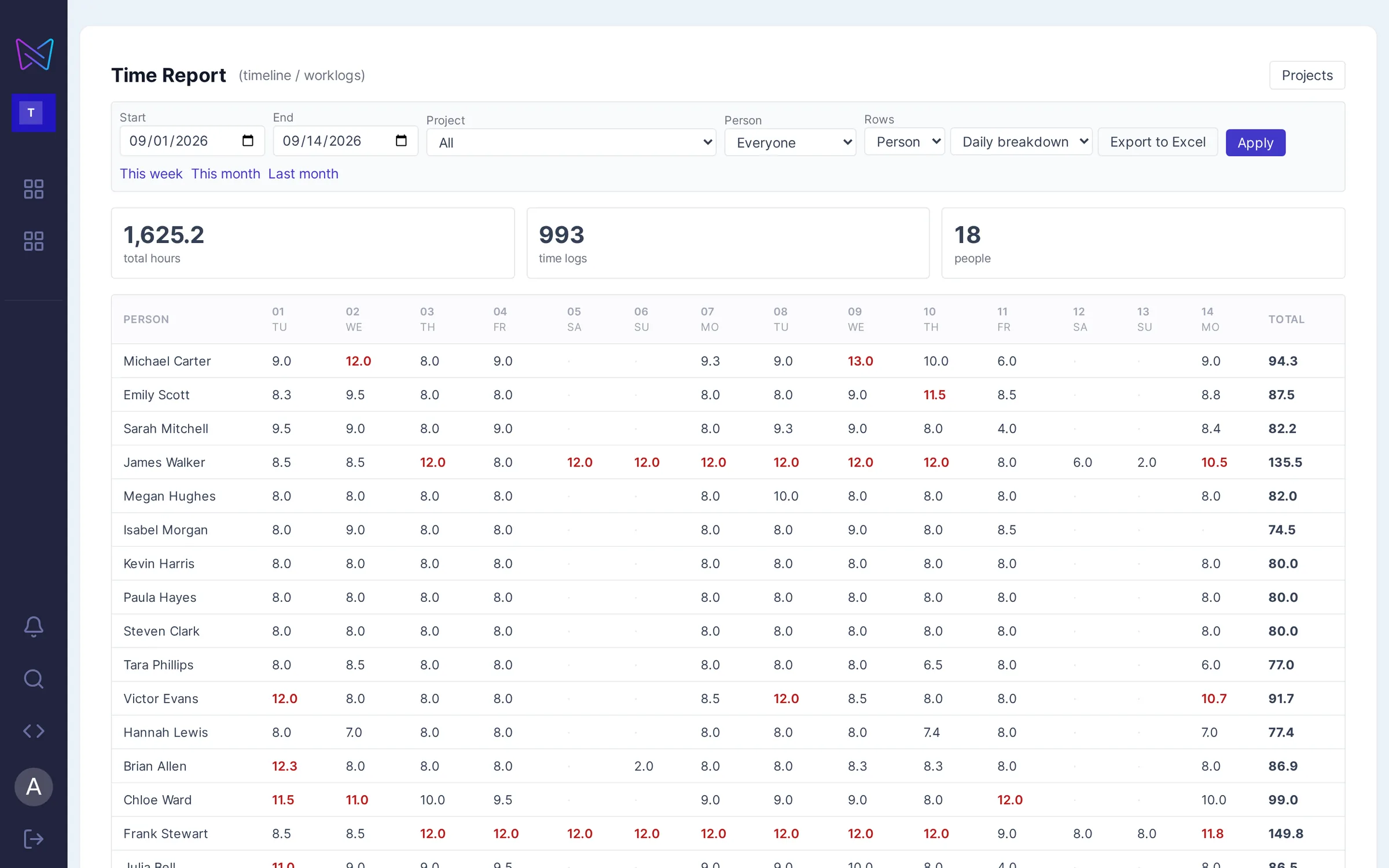
Timesheet report: person × day effort grid
Timesheet report

Effort by person and day.

Time entries are collected in a person × day grid; days that exceed the daily limit are flagged. The report can be exported to Excel.

Integration

Your integrations keep working. Same API, new address.

  • REST API (v2 and v3), agile board and sprint endpoints and service desk endpoints are served with the same paths and parameters.
  • Webhooks are sent signed; scripts and automations that use supported endpoints can keep working with a change of address and access key.
  • Authentication: email and API key, or a personal access token.
Limits we state up front: Marketplace add-ons don't carry over one to one; the functionality you need is rebuilt in Butterfly. In-app OAuth (3LO) connections are not supported. Which features carry over one to one is listed in writing before the migration.
Platform API/rest/api/2 · /rest/api/3Issue, comment, worklog, attachment, project, search (JQL), filter, board
Agile endpoints/rest/agile/1.0Board, sprint, backlog, epic, ranking
Service desk/rest/servicedeskapiRequest, queue, SLA, approval, participant
Webhook/rest/webhooks/1.0Issue, comment, worklog and sprint events; signed delivery

Which teams is it for?

Teams whose critical workflows depend on an issue tracker.

Banking and insurance

CIO, enterprise applications, IT security and operationsWhy? ↻
Why?

If the work management tool is tied to procurement and internal approval processes, a migration must preserve approval rules and the audit trail as well as records.

What it does

Define the migration scope for processes like procurement and internal approvals, and validate ERP connections and historical records.

CIO, enterprise applications, IT security and operations

Public sector and state-owned companies

IT, process owners and internal control teamsWhy? ↻
Why?

Approval and document flows are expected to run on the organization’s own infrastructure, in a traceable way.

What it does

Keep approval and document flows running in a structure that fits the organization’s operating conditions.

IT, process owners and internal control teams

Defense industry

Information security, IT infrastructure and project managementWhy? ↻
Why?

Cloud-based work management tools can’t be used in air-gapped environments; work management has to run on-premises.

What it does

Assess work management and approval flows running on-premises or in air-gapped environments.

Information security, IT infrastructure and project management

Manufacturing and field operations

Maintenance, procurement and enterprise applicationsWhy? ↻
Why?

Maintenance and purchase requests are tied to the ERP; that connection must not break when the tool changes.

What it does

Track ERP-connected maintenance and purchase requests together with their status and approval steps.

Maintenance, procurement and enterprise applications
Butterfly’s own migration

The Butterfly team moved its own work tracking to TaskFlow in one day.

On September 19, 2026, the RG Labs team that builds Butterfly moved all of its own work management to TaskFlow. On the same day, 89 projects, 32,130 work items, 34,112 time entries and 667,864 change history records were migrated. The migration also moved 119 saved filters and 133 sprints. Eight metrics, including the number of items in the active sprint, open items and effort breakdowns, were compared with the source system; all eight matched. The migration was completed with a 69-test quality control report.

  • Historical records and change history were migrated in full.
  • Teams' working practices were preserved with sprints, boards and saved filters.
  • Eight metrics were compared with the source system; all eight matched.
667,864change history records
119saved filters
133sprint
8/8matched one-to-one
Brochure

Explain TaskFlow to your team with a single document.

Download the brochure summarizing capabilities, deployment options and the numbers from our own migration, and share it with your team.

Needs assessment

How much sense does moving to TaskFlow make for you?

8 questions, two minutes. At the end, see a scorecard of your need to move off your work management tool and modernize processes.

  • Current tool
  • Process links
  • Integration
  • Data residency
8 questions · about 2 minutes
Current tool1 / 8
Is your work management tool’s support or licensing timeline putting pressure on you?
Current tool2 / 8
How are add-on and license costs?
Process links3 / 8
Is your work management tool also used in procurement, maintenance or approval processes?
Process links4 / 8
How long does it take to add a new approval step?
Integration5 / 8
How many systems or scripts are connected to your work management tool?
Integration6 / 8
Is an ERP connection required?
Data residency7 / 8
Do your work records need to stay on-premises or in Türkiye?
Data residency8 / 8
Do you need to work in an air-gapped environment?
See your readiness scorecard · 2 min
Frequently asked

Quick answers about TaskFlow.

Will our existing integrations keep working?
For integrations that use supported endpoints, changing the address and access key may be enough. API version, authentication and webhook usage are validated one by one against the inventory.
Which records are migrated?
Projects, issues, comments, attachments, time entries, sprints, boards and change history can be included in the migration scope. In the Butterfly team’s own migration, 89 projects and 32,130 issues were moved on the same day.
What happens to the add-ons we use?
Marketplace add-ons are not transferred directly. The add-on functionality actually in use is identified, and what’s needed is assessed for rebuilding on Butterfly.
Can it be deployed on-premises?
On-premises, private cloud and air-gapped options are available. The deployment model is assessed together with your integrations and infrastructure requirements.
How long does the migration take?
It depends on record volume, workflows and existing integrations. In the initial assessment, we determine which parts will be migrated, which will be rebuilt and which will remain out of scope.

Let’s start the migration plan with your most critical workflow.

Let's review a procurement, maintenance or approval process together. We'll determine which records will be migrated, which connections will be tested and which rules will be rebuilt in Butterfly.