Skip to content
Butterfly

A meeting assistant you can run on-premises.

Your meeting data is processed on-premises. Decisions land in your inbox.

Butterfly Note Taker joins Teams, Zoom and Google Meet meetings from your calendar, transcribes conversations in Turkish and, when the meeting ends, emails participants the summary, decisions and action items. In an on-premises deployment, audio processing, transcription and summarization run on your own servers and AI infrastructure.

FU
OL
TeamsMeetZoom
Procurement Manager
Weekly procurement meetingCalendar · 5 participants · Note Taker joins
RECButterfly Note Taker
Procurement Manager
FU
Finance Specialist
IT Lead
OL
Operations Lead

Transcribing12:34

Procurement Manager

Decisions
3 over-limit requests go to CFO approval
Supplier portal goes live on Friday
Action items
Portal integration testIT · Thursday
Limit reportFinance · Today
Field announcementOperations · Friday
Summary sent to participants
Joins the meeting on the calendar · transcribes conversations · extracts decisions and action itemsRepresentative flow · fictional people
Problem

Make meeting decisions findable after the meeting, too.

A decision is made in a meeting. Two weeks later, the team is digging through email and chat history to find the conditions behind the decision or what the next step was.

And when conversations are subject to internal data policies, using an external meeting notes service may not be an option.

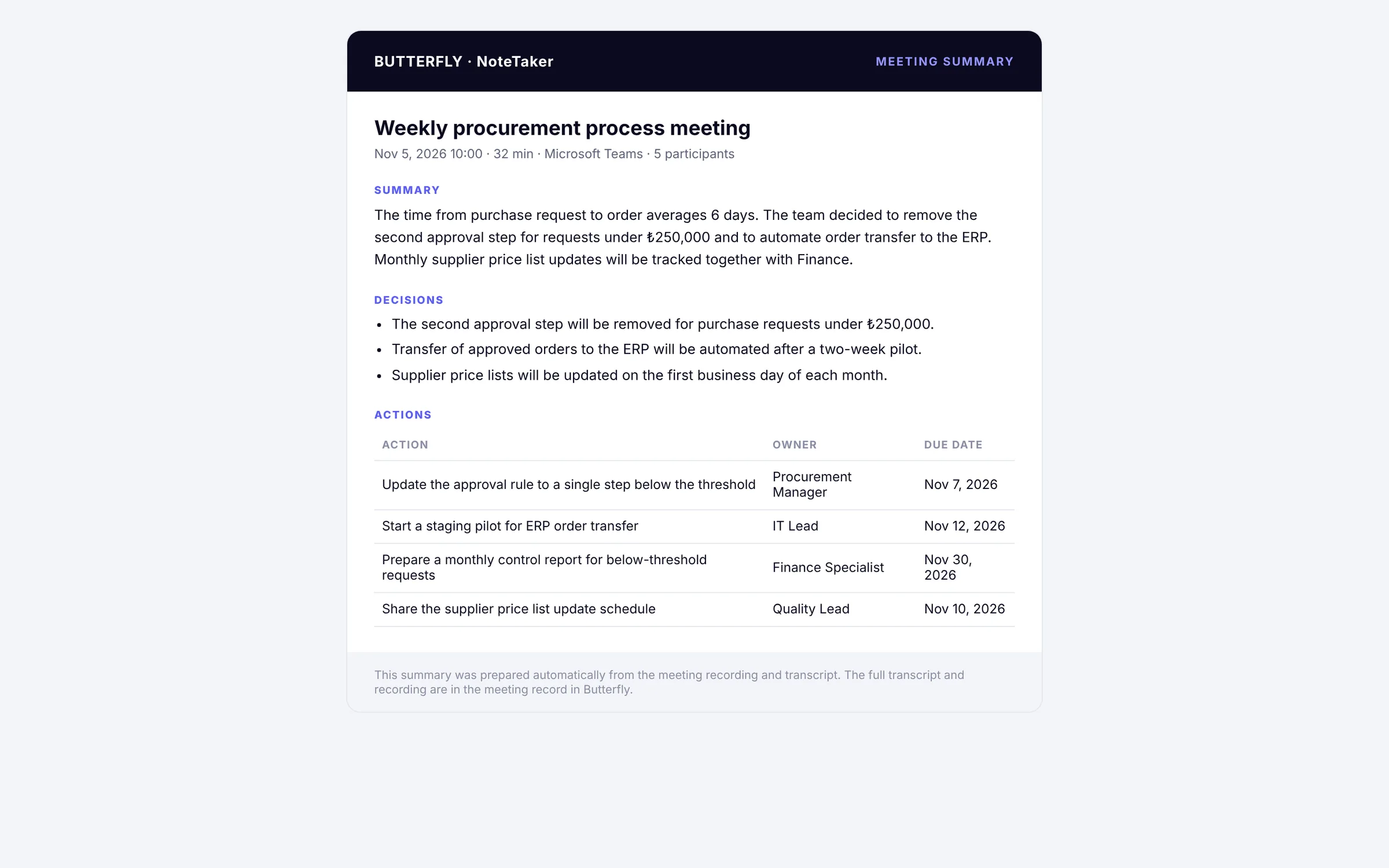
Meeting summary email sent to participants
For participants

A shared summary in your inbox as soon as the meeting ends.

Decisions and action items, with owners and due dates, go to participants by email; everyone works from the same summary.

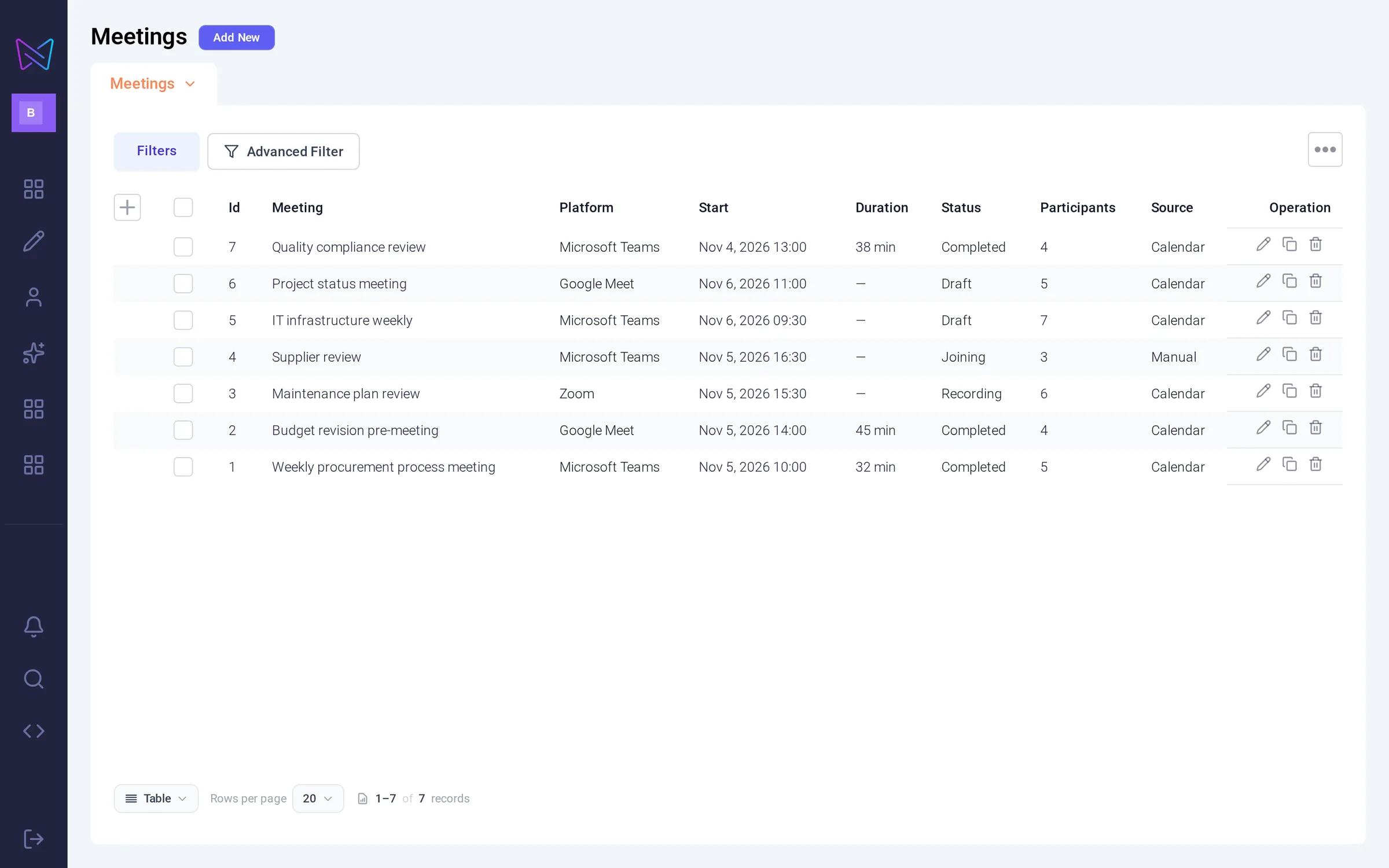
Meeting archive: with date, platform, status and source
For the organization

Recordings and summaries build up in one place.

Past meetings can be found by date, meeting and participant, and you can find which meeting a decision was made in.

How does it work?

From calendar invite to meeting record.

Meetings come from the calendar: platform, start time, status and sourceFrom the calendar
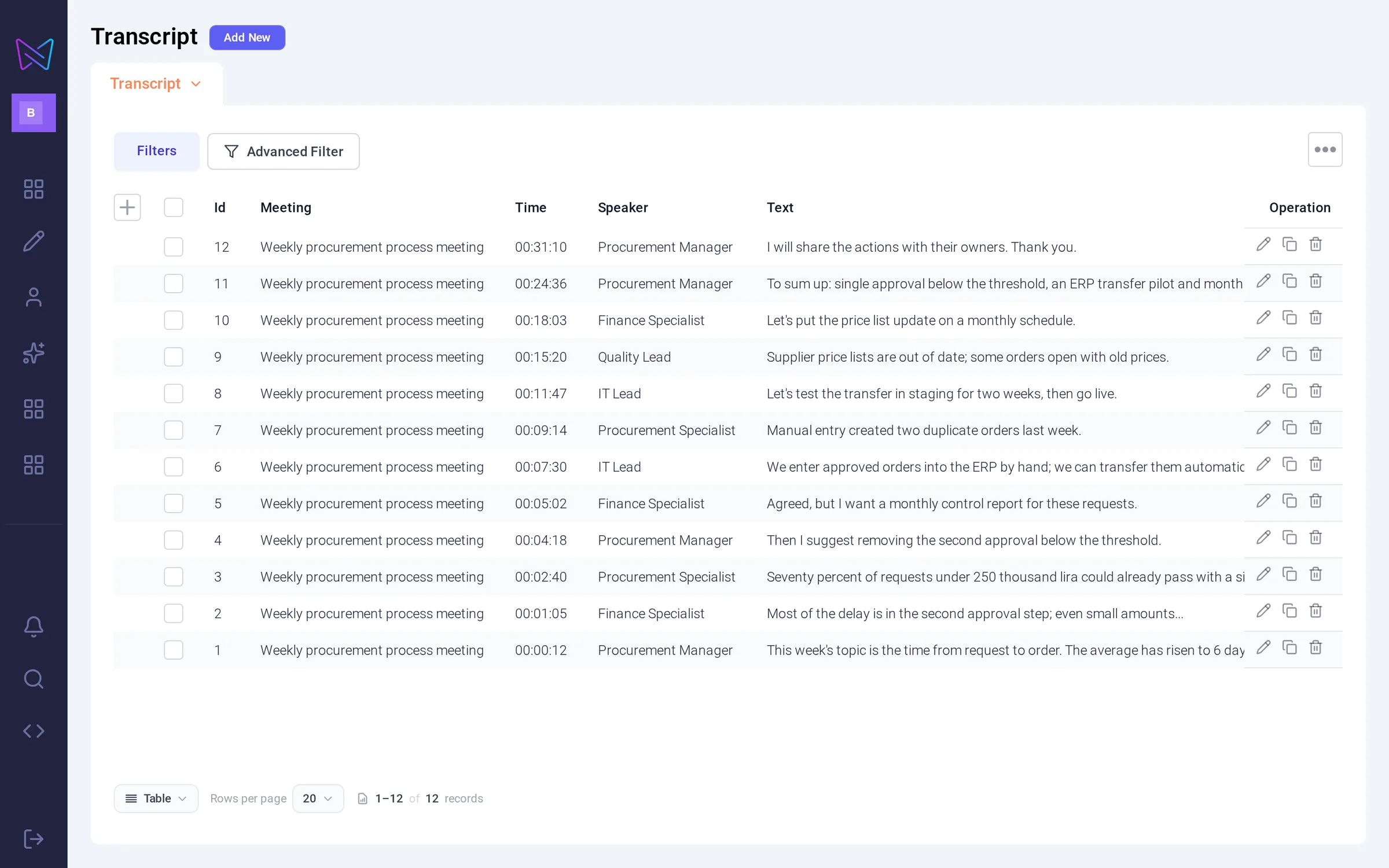
Meeting transcript: with timestamps and speakersSpeaker and transcript
Email to participants: summary, decisions, owner and due dateDecisions and action items
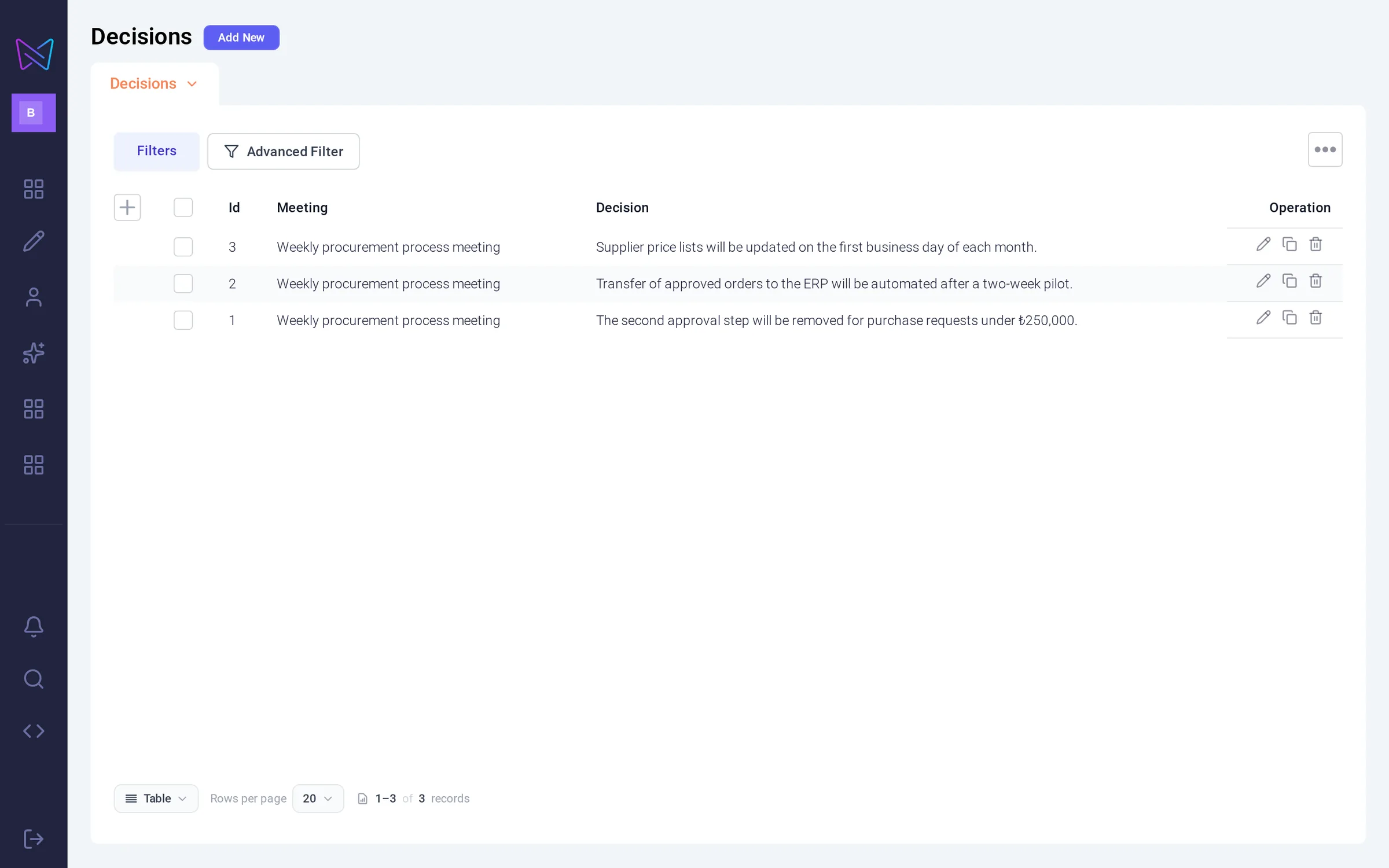
Decisions are recorded along with the meeting they were made inDecisions
Meetings come from the calendar: platform, start time, status and source

Real Butterfly screens · sample meeting data

Which teams is it for?

Teams whose meetings must stay on-premises.

Banking and insurance

Information security, IT infrastructure, operations and project managementWhy? ↻
Why?

Information security policy often prevents meeting audio and decisions from leaving the organization, so external note-taking services can’t be used.

What it does

Process meeting content on the organization’s own infrastructure and find operational decisions later.

Information security, IT infrastructure, operations and project management

Public sector and state-owned companies

IT, coordination and project teamsWhy? ↻
Why?

Meeting records are expected to stay on the organization’s own infrastructure; when the same topic resurfaces weeks later, you need to get back to the earlier decision quickly.

What it does

Recall decisions from internal project and coordination meetings in later discussions.

IT, coordination and project teams

Pharmaceuticals

Quality, regulatory and operations teamsWhy? ↻
Why?

Decisions and action items from quality and regulatory meetings must be traceable; in an audit, you need to show who decided what.

What it does

Return to decisions and action items from quality and project meetings through a shared summary.

Quality, regulatory and operations teams
From the field

At a bank, meeting recordings and transcripts are produced inside the bank’s network.

The bank needed meeting data to stay inside its network. So Note Taker was deployed fully on-premises, on the bank’s own server: the bot joins Teams meetings from the bank network, keeps the recording on the bank’s server and transcribes the conversation with a speech recognition model on the bank’s own AI infrastructure.

  • Meeting audio and transcripts never leave the organization’s network.
  • The organization’s existing AI investment is reused; no separate cloud subscription is needed.
  • The IT team manages the installation to its own server standards.
0audio recordings sent to an external note service
4concurrent meetings on a single server (8 cores, 16 GB recommended profile)
No GPUon the bot server; models on the bank’s existing AI infrastructure
Local installationon the bank’s Linux server, with no containers required
Needs assessment

Note Taker and your organization: how good a fit?

8 questions, two minutes. At the end, see Note Taker’s fit scorecard for your organization and the reasons behind it.

  • Data privacy
  • Meeting overload
  • Decision tracking
  • Infrastructure
8 questions · about 2 minutes
Data privacy1 / 8
Are meeting recordings allowed to be processed outside the organization?
Data privacy2 / 8
Do you need to show meeting decisions in audits or for regulatory purposes?
Meeting overload3 / 8
How many hours a week does a manager spend in meetings?
Meeting overload4 / 8
Where are meetings mostly held?
Decision tracking5 / 8
Where are meeting decisions kept today?
Decision tracking6 / 8
How often do you need to go back to a decision from a past meeting?
Infrastructure7 / 8
Do you have in-house speech recognition or language model infrastructure?
Infrastructure8 / 8
How are the summary and action items delivered to meeting participants?
See your readiness scorecard · 2 min
Frequently asked

Quick answers about Note Taker.

Which meeting platforms does it support?
Microsoft Teams, Zoom and Google Meet.
What do participants receive when the meeting ends?
The meeting summary, decisions made and action items are sent by email.
Can we go back to past meetings?
Recordings and summaries accumulate in Butterfly. You can find past conversations in this archive by date, meeting and participant.
Can it be deployed on-premises?
Yes. The bot, recording and processing can run on your organization’s servers; the organization’s own AI infrastructure can be used for audio processing and summarization.

Let’s look at where your meeting data is processed, together.

Let’s discuss how the bot joins, the post-meeting email and the on-premises deployment model, based on the meeting platform you use and your infrastructure requirements.